Revenue Dashboard: Accessibility-First

Revenue Dashboard: Accessibility-First

Revenue Dashboard:

Accessibility-First

WCAG 2.1 AA compliant, keyboard navigable, screen reader tested.

WCAG 2.1 AA compliant, keyboard navigable, screen reader tested.

WCAG 2.1 AA compliant, keyboard navigable, screen reader tested.

What I Built

What I Built

What I Built

What I Built

Revenue dashboard for SaaS founders tracking Monthly Recurring Revenue, customer growth, churn rates, and revenue per account.

Built accessibility into every decision from the start—keyboard navigation, screen reader support, WCAG AA compliance throughout.
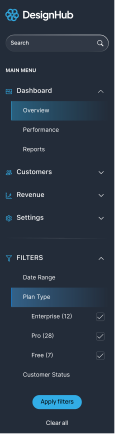
Overview

A

Time

7D

1M

3M

6M

1Y

Nov 19 - Dec 15, 2025

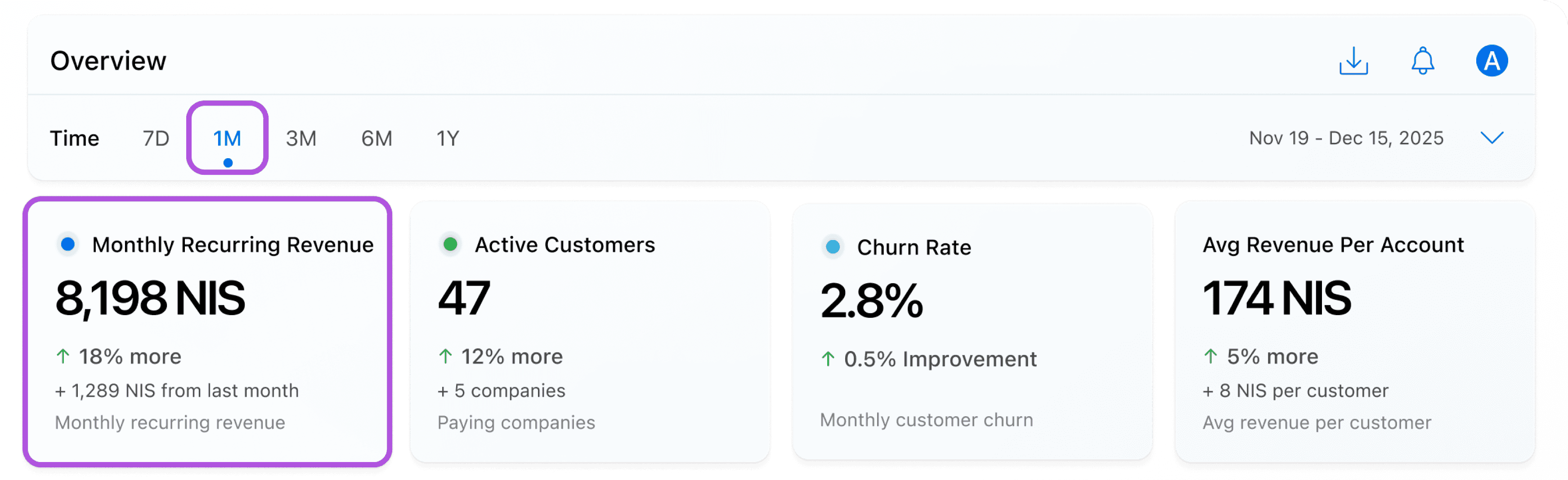
Monthly Recurring Revenue

8,198 NIS

􀄨

18% more

+ 1,289 NIS from last month

Monthly recurring revenue

Active Customers

47

􀄨

12% more

+ 5 companies

Paying companies

Churn Rate

2.8%

􀄨

0.5% Improvement

New designers joined

Monthly customer churn

Avg Revenue Per Account

174 NIS

􀄨

5% more

+ 8 NIS per customer

Avg revenue per customer

Revenue Growth - Last 30 Days

8,198.72 NIS

289.78 NIS more then usual

Show more

12K

10K

8K

6K

4K

0K

Nov 19, 2025

Nov 21, 2025

Nov 27, 2025

Dec 2, 2025

Dec 7, 2025

Dec 10, 2025

Dec 15, 2025

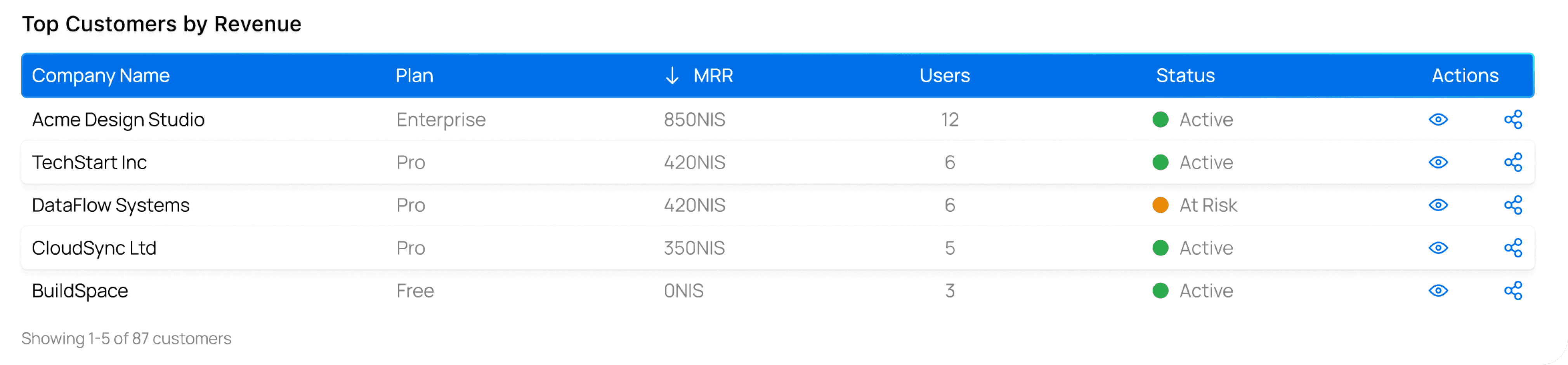
Top Customers by Revenue

Company Name

Plan

MRR

Users

Status

Actions

Acme Design Studio

Enterprise

850NIS

12

Active

TechStart Inc

Pro

420NIS

6

Active

DataFlow Systems

Pro

420NIS

6

At Risk

CloudSync Ltd

Pro

350NIS

5

Active

BuildSpace

Free

0NIS

3

Active

Showing 1-5 of 87 customers

Accessibility Features

Accessibility Features

Accessibility Features

Accessibility Features

WCAG 2.1 AA compliant (14.08:1 contrast verified)

Complete keyboard navigation with visible focus

NVDA screen reader tested

ARIA live regions for metric updates

Sortable tables with announcements

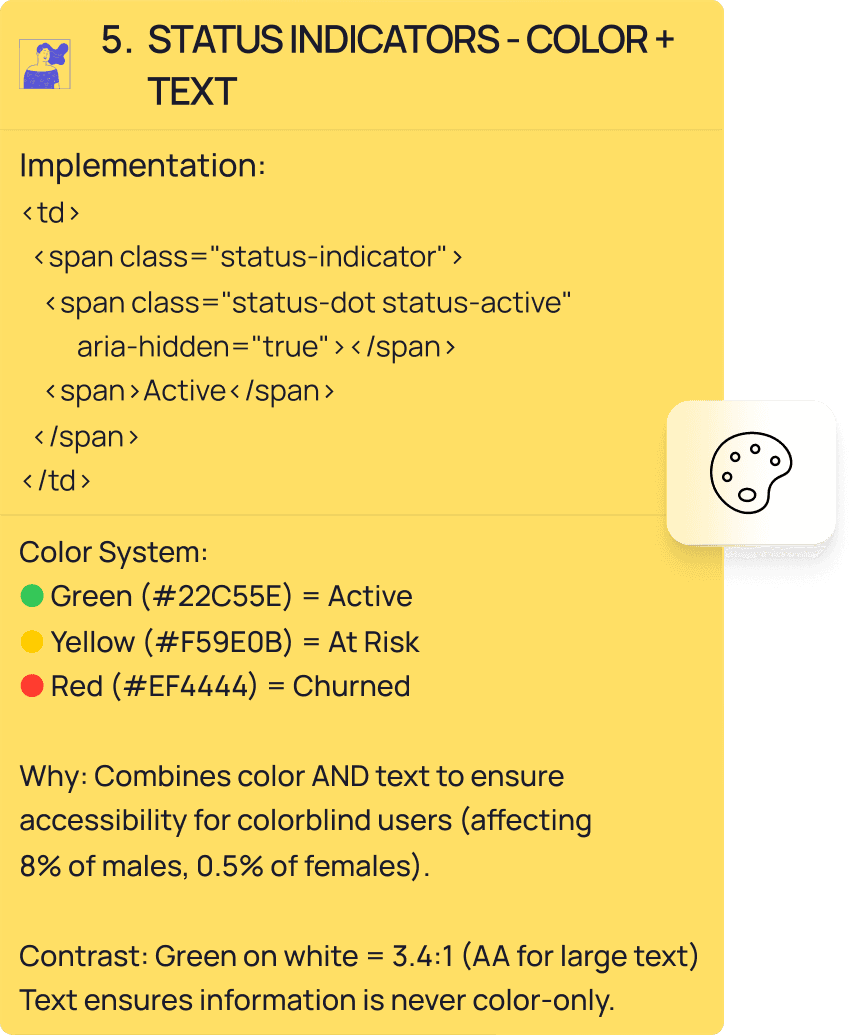
Color + text status indicators

44px touch targets (32px dense tables)

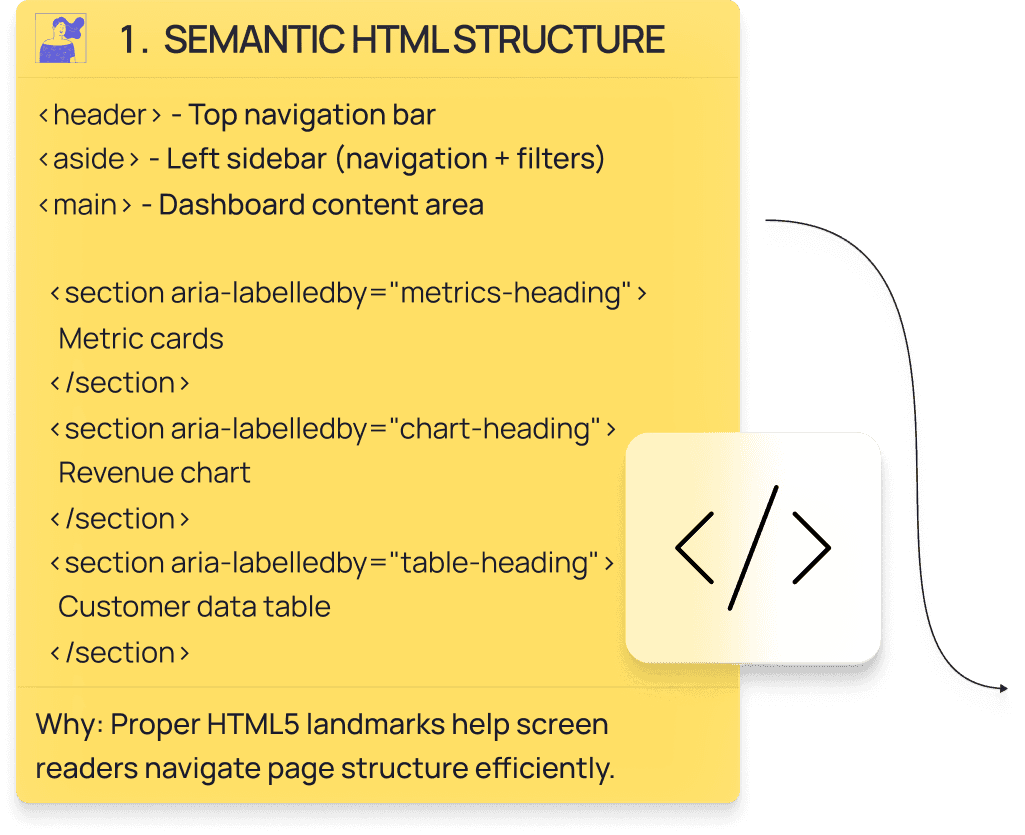
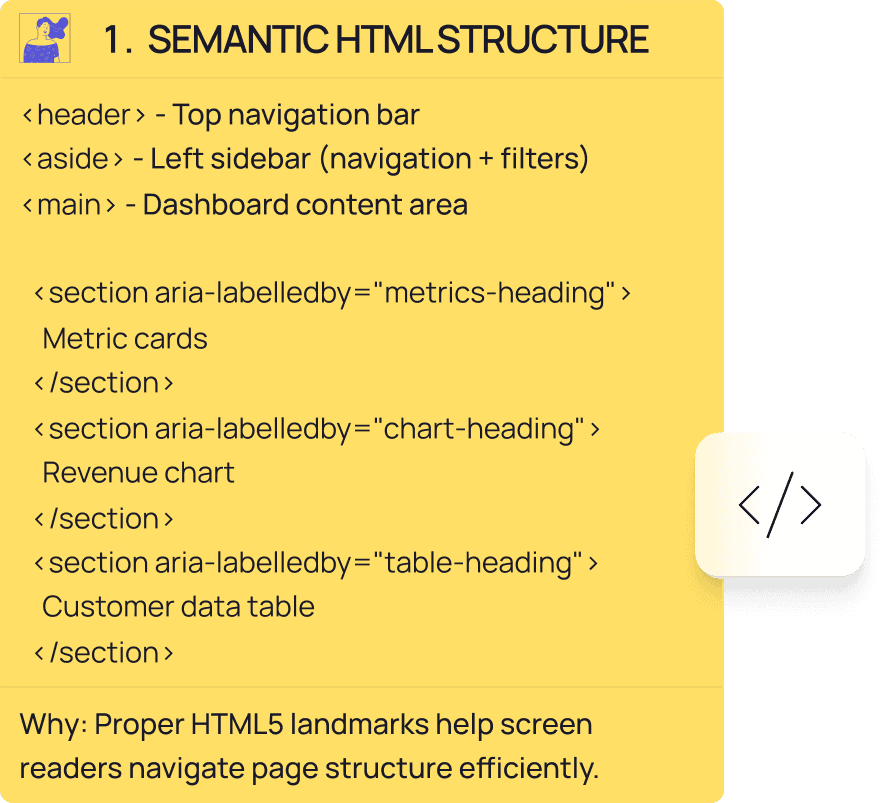
Semantic HTML structure

Monthly Recurring Revenue

8,198 NIS

18% more

+ 1,289 NIS from last month

Monthly recurring revenue

Active Customers

47

12% more

+ 5 companies

Paying companies

Avg Revenue Per Account

174 NIS

5% more

+ 8 NIS per customer

Avg revenue per customer

Churn Rate

2.8%

0.5% Improvement

New designers joined

Monthly customer churn

Four Features Demonstrating Systematic Accessibility

Four Features Demonstrating Systematic Accessibility

Business Metrics with Live Updates

Business Metrics with Live Updates

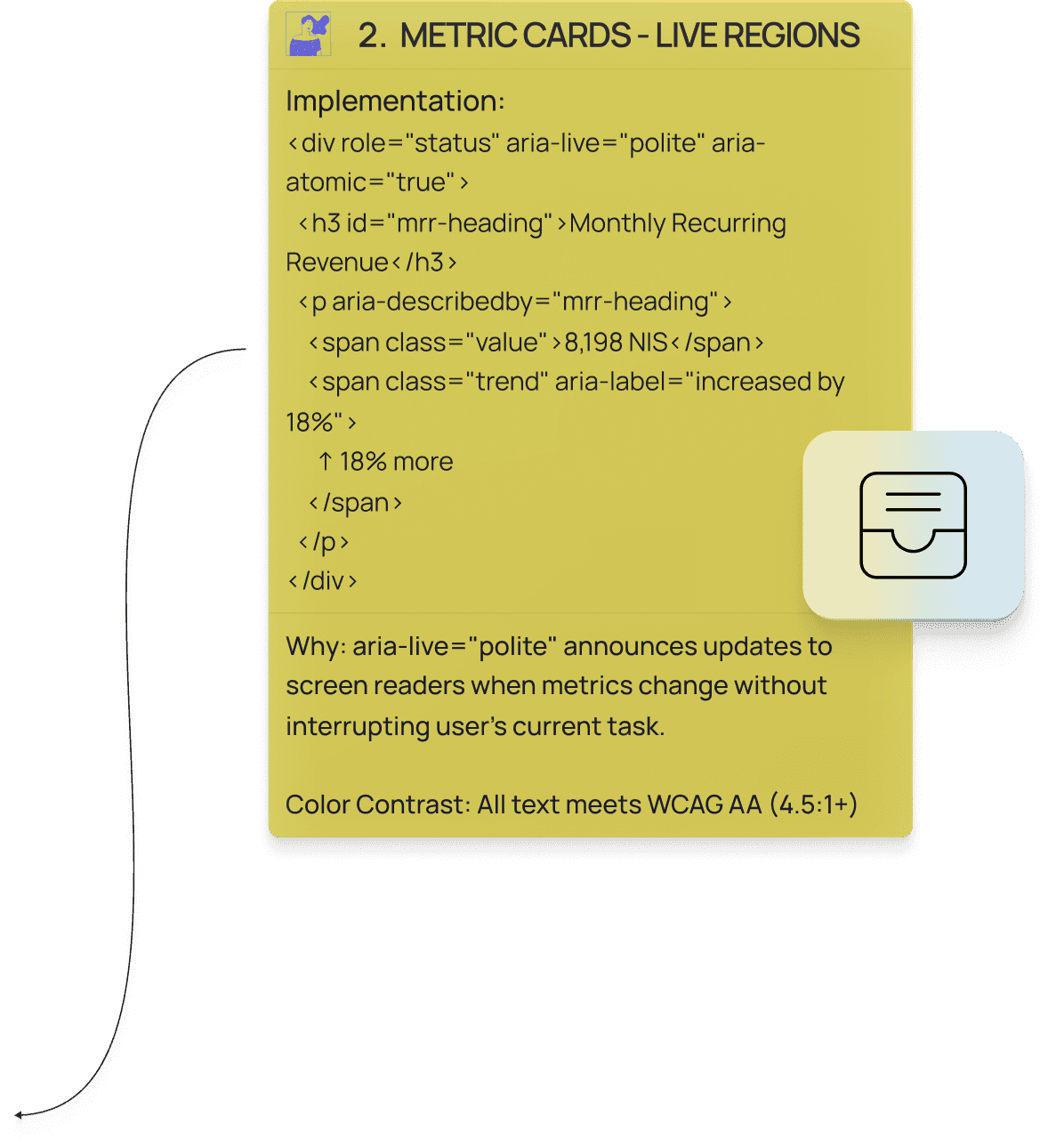
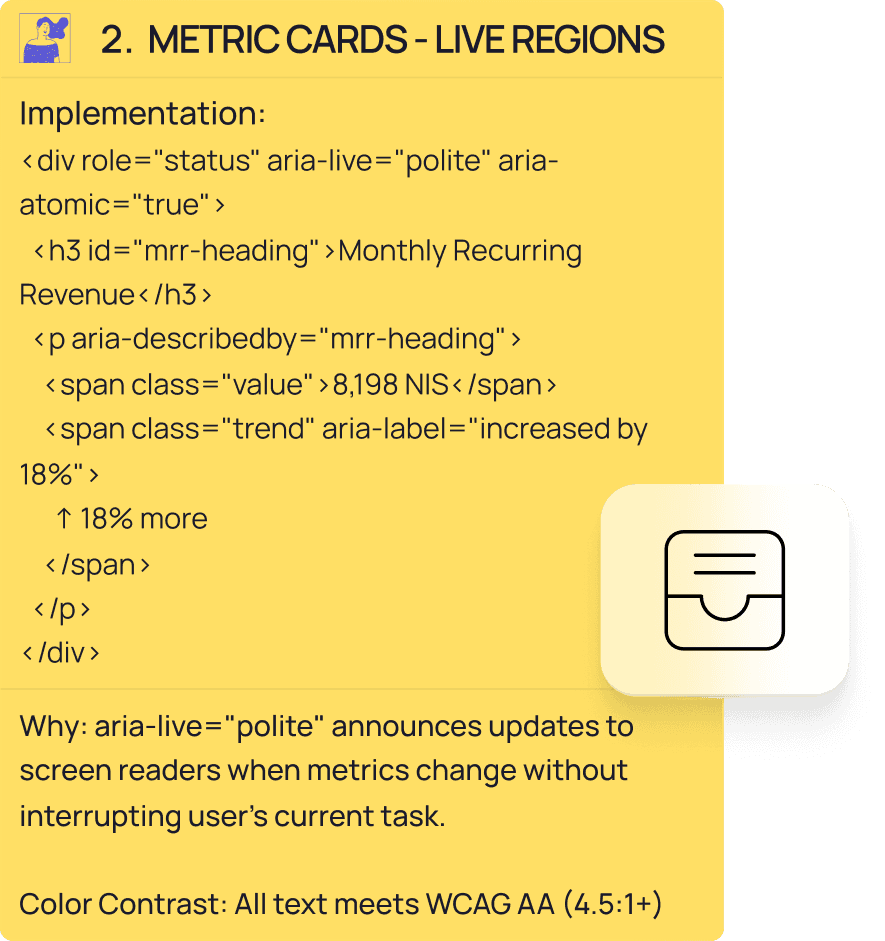
Four metric cards with 36px typography and trend indicators using arrows plus text—never color alone.

Implemented aria-live="polite" regions that announce updates without interrupting flow:

"Monthly Recurring Revenue updated to 8,198 NIS, increased by 18%."

Verified contrast ratios: Primary text 21:1 (AAA), trend indicators 3.01:1 (AA).

Keyboard-Navigable Charts

Keyboard-Navigable Charts

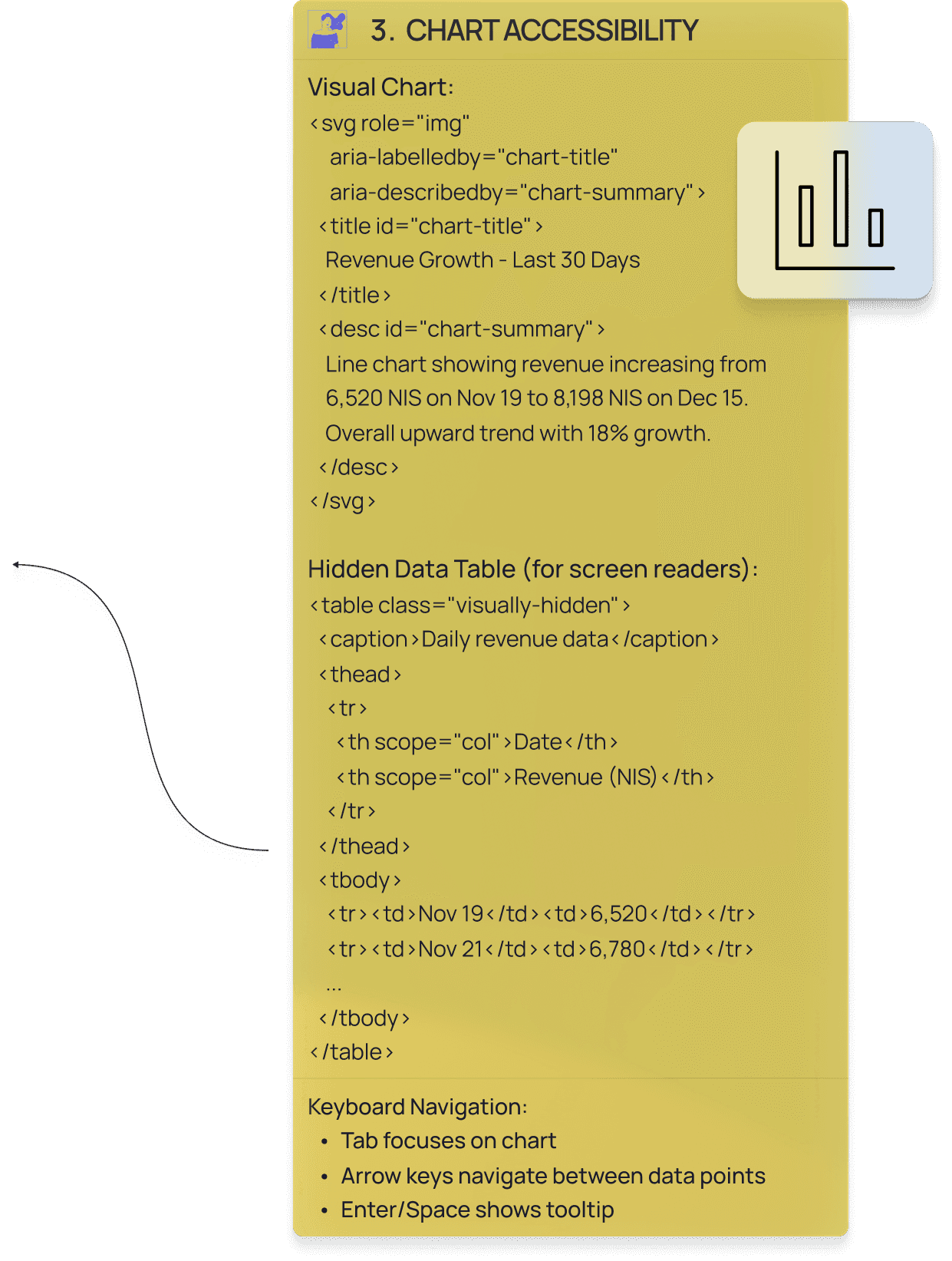
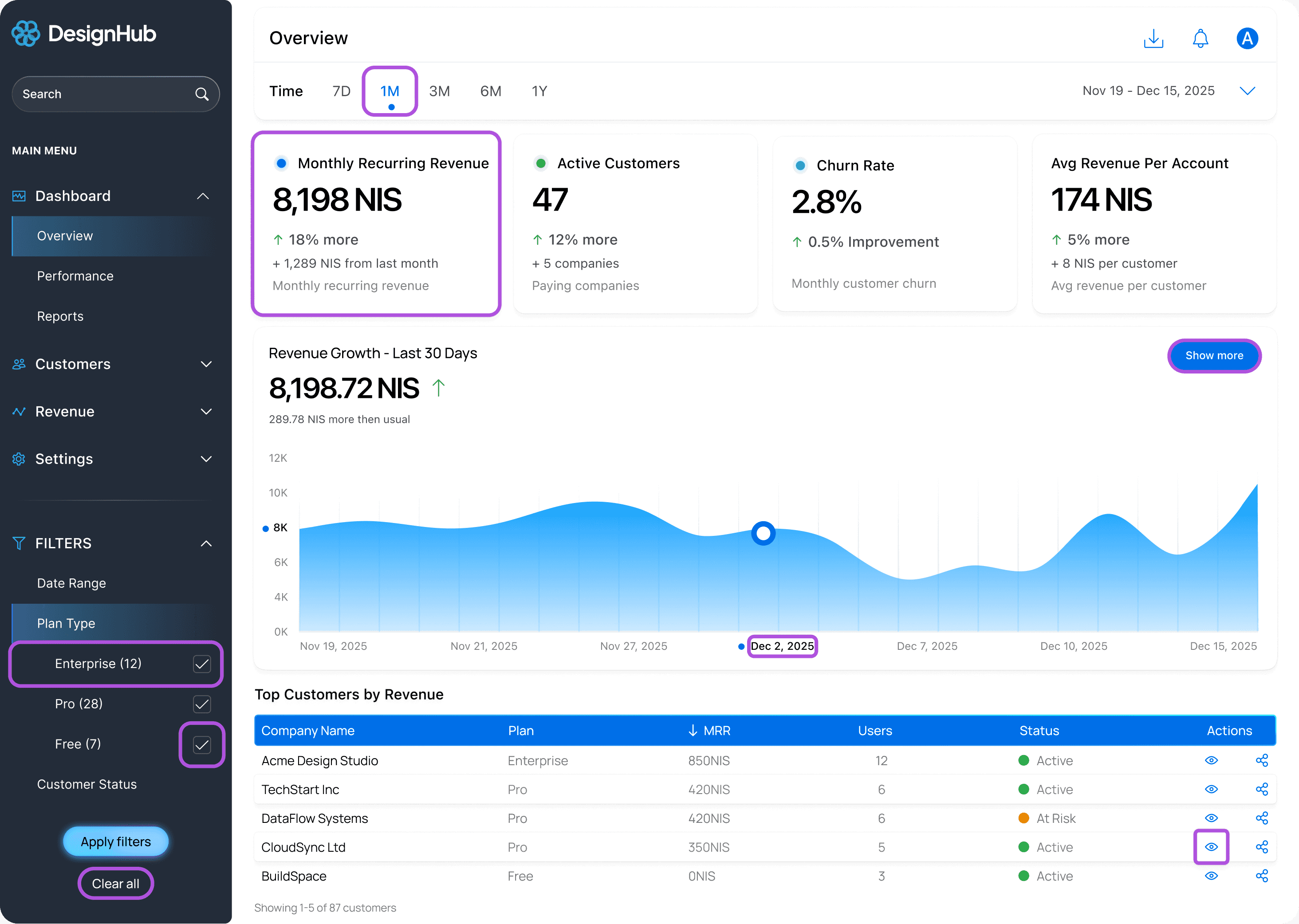
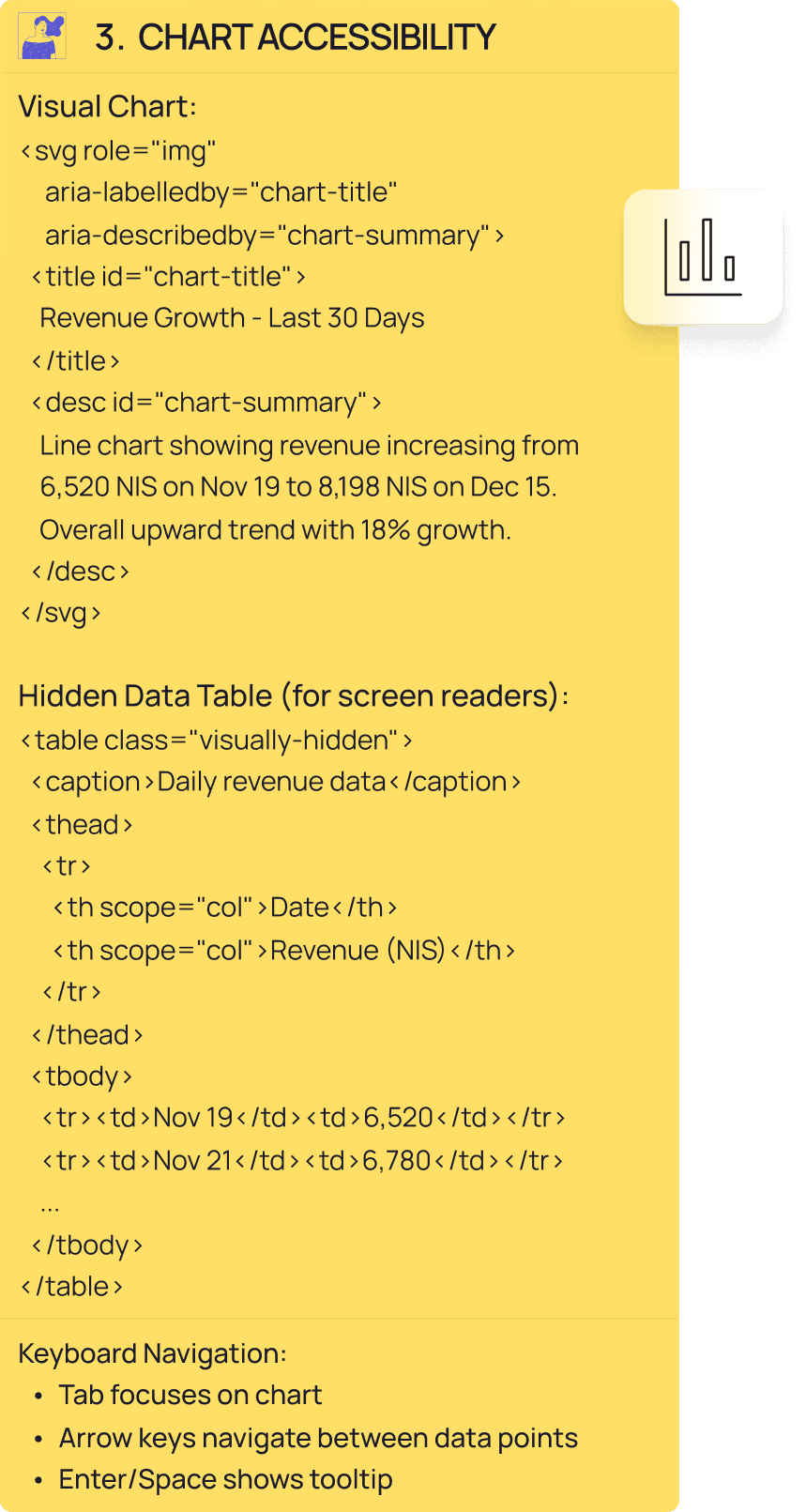
30-day revenue chart works with hover, but keyboard users explore with arrow keys and Enter for tooltips.

Used with description: "Line chart showing revenue increasing from 6,520 NIS to 8,198 NIS. Overall upward trend with 18% growth."

Screen reader users get a hidden data table with complete dataset.

Visual users get the chart. Everyone gets access.

Sortable Tables with Announcements

Sortable Tables with Announcements

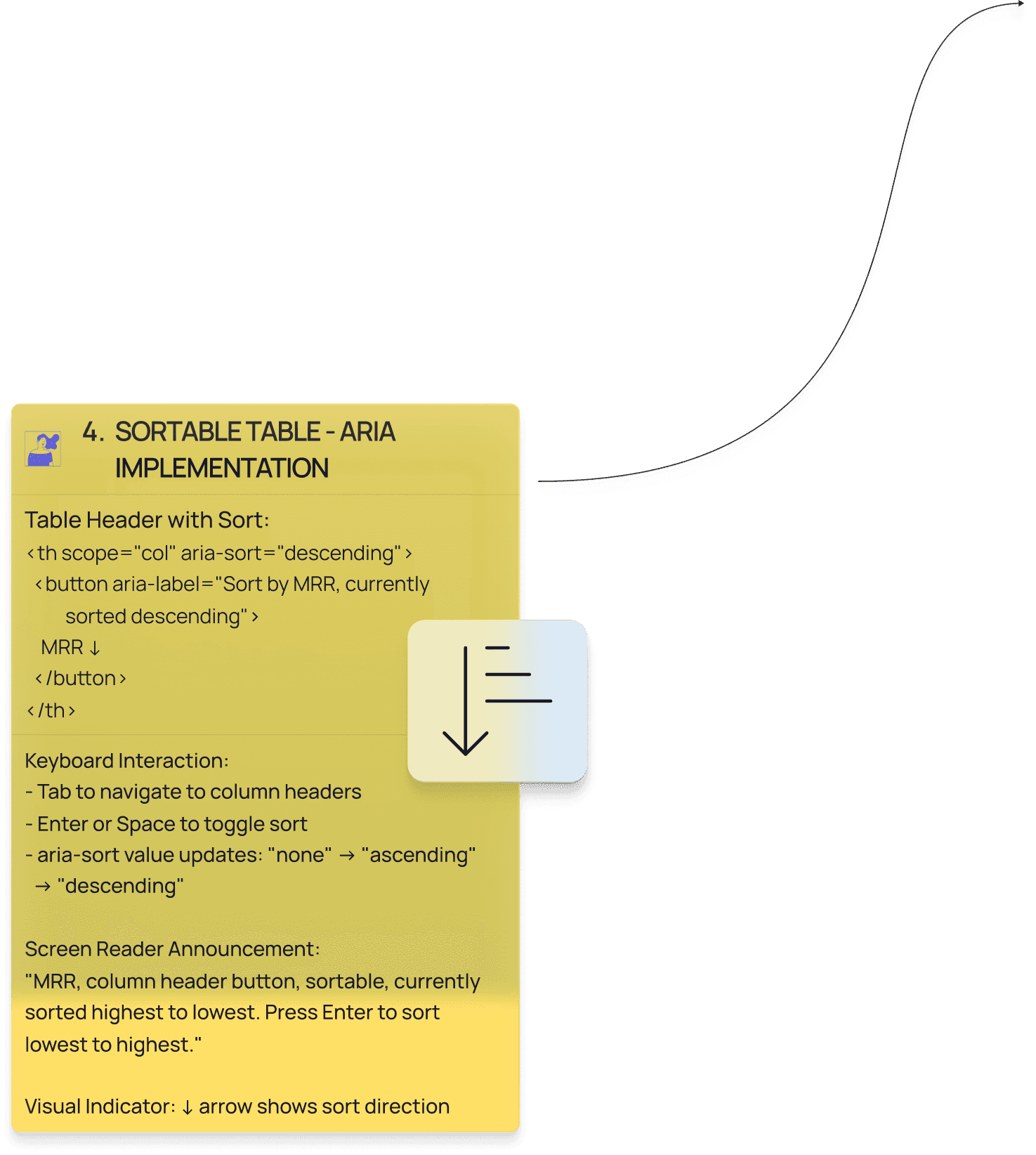
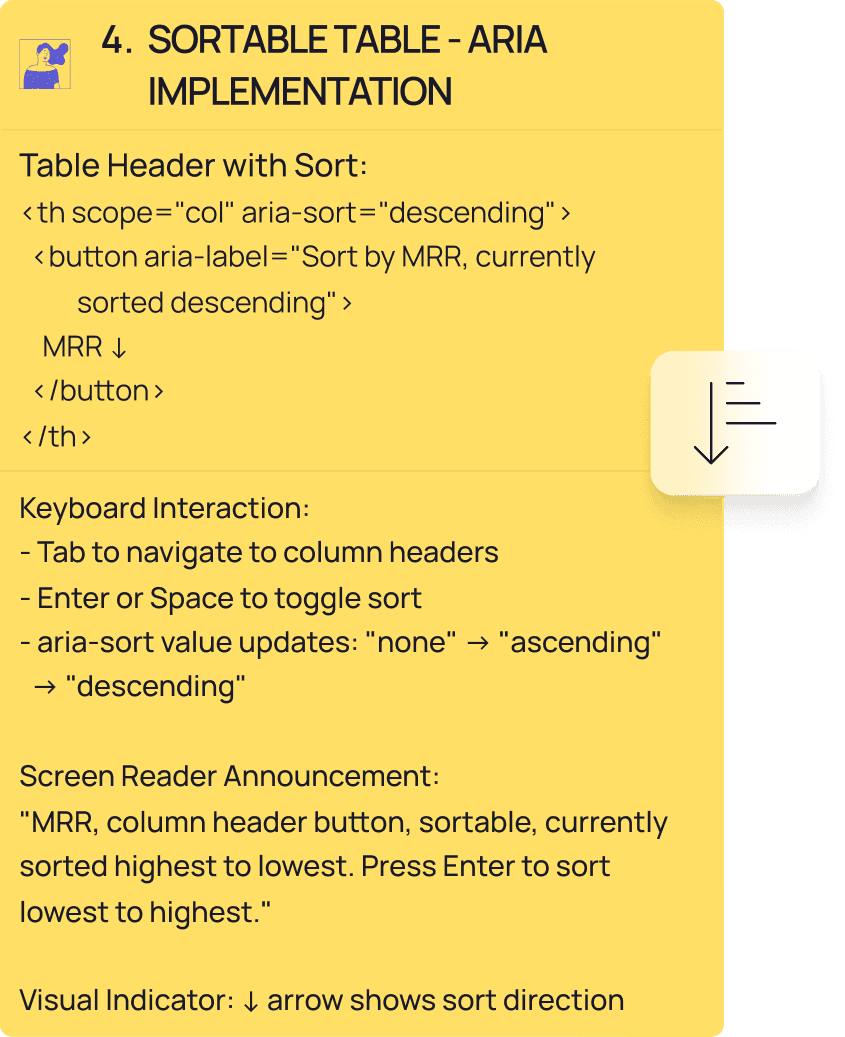
• Click or press Enter to sort columns.

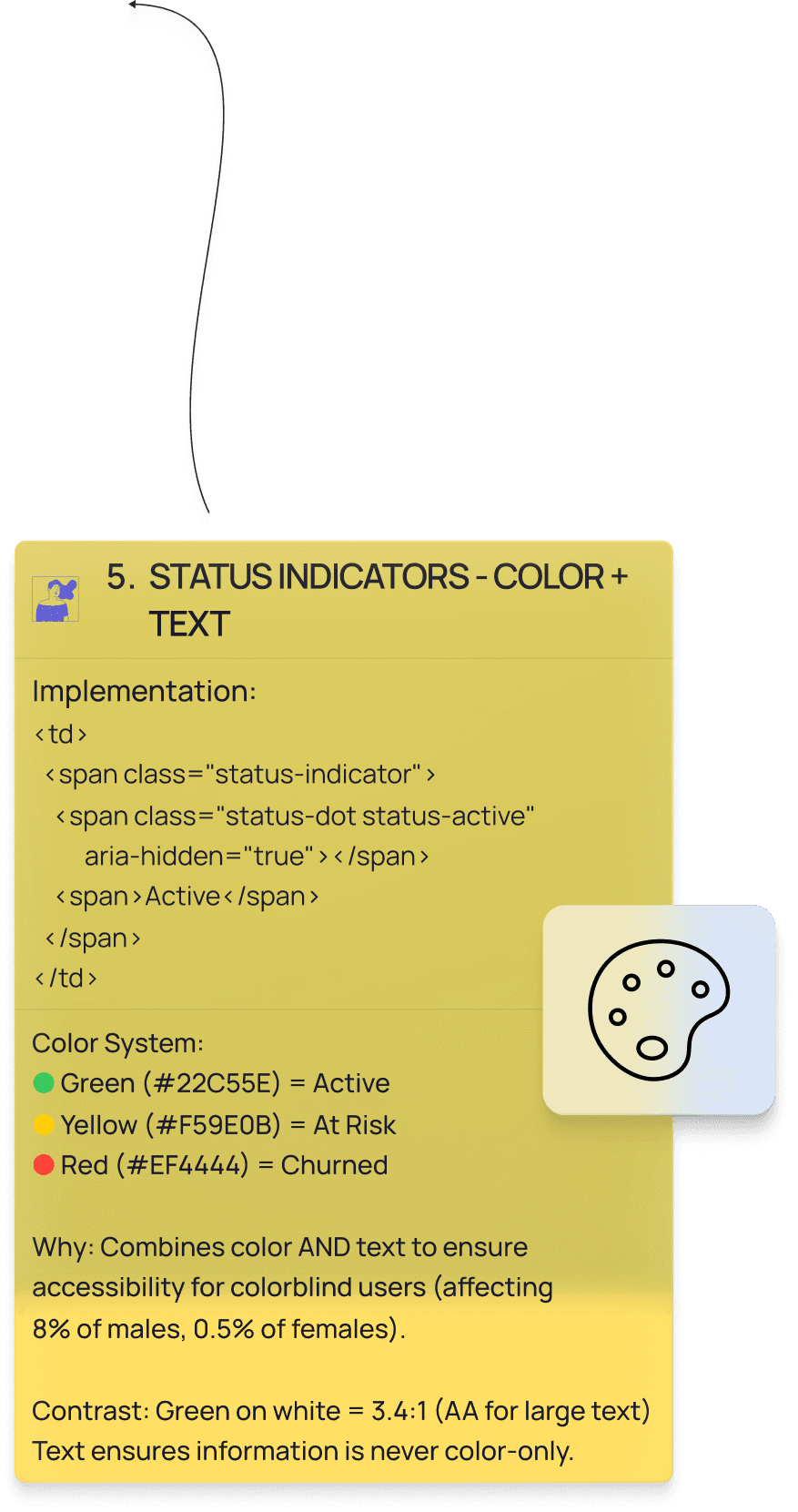
• Status indicators: Green "Active", Yellow "At Risk", Red "Churned"—color plus text always.

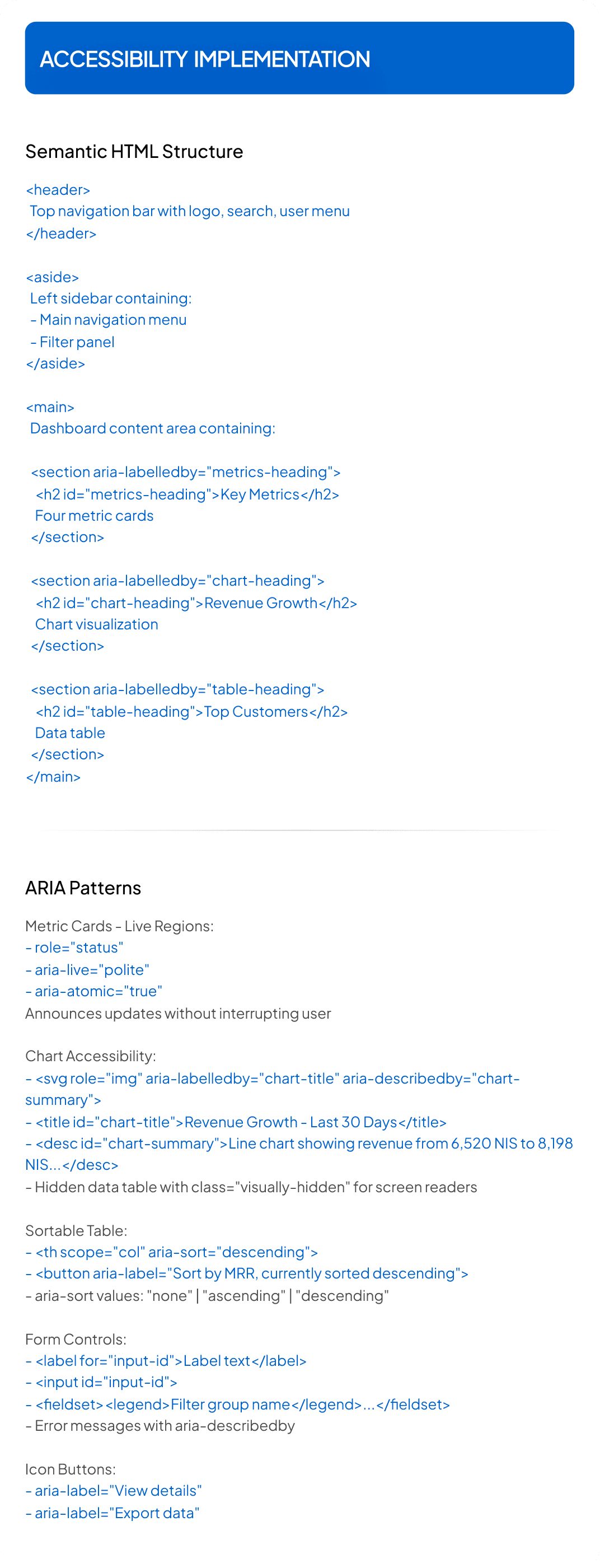
• Sortable headers use <th scope="col" aria-sort="descending"> with buttons.

  • Screen readers announce: "MRR, sortable, currently highest to lowest. Press Enter to sort."

  • Status dots: <span aria-hidden="true"></span> <span>Active</span> hides decoration, keeps text.

  • Table rows 32px (acceptable for desktop density). Interactive elements 44px touch targets.
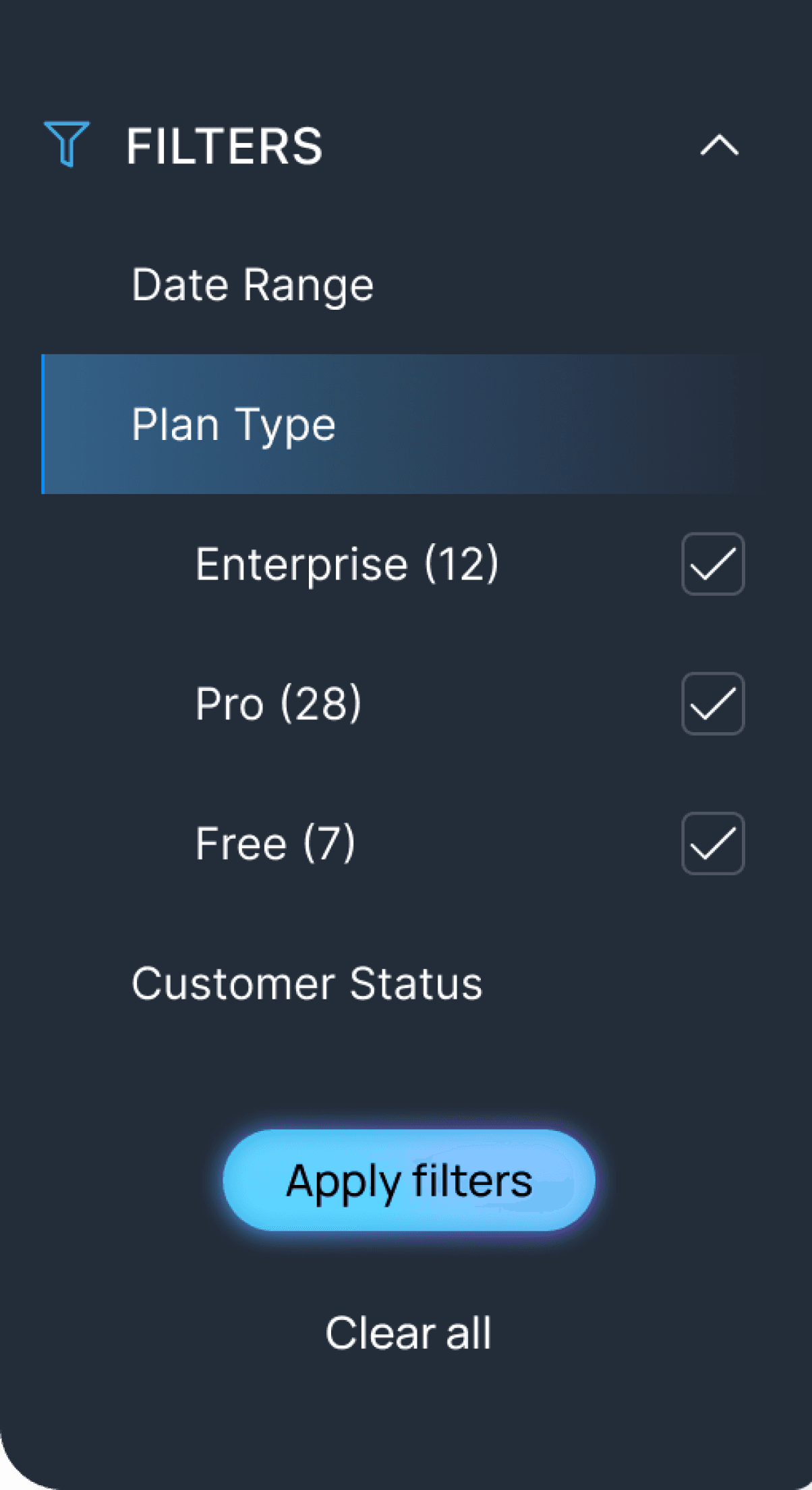
Filter Forms with Structure

Filter Forms with Structure

Filter Forms with Structure

• Segment by plan type, status, or date range.

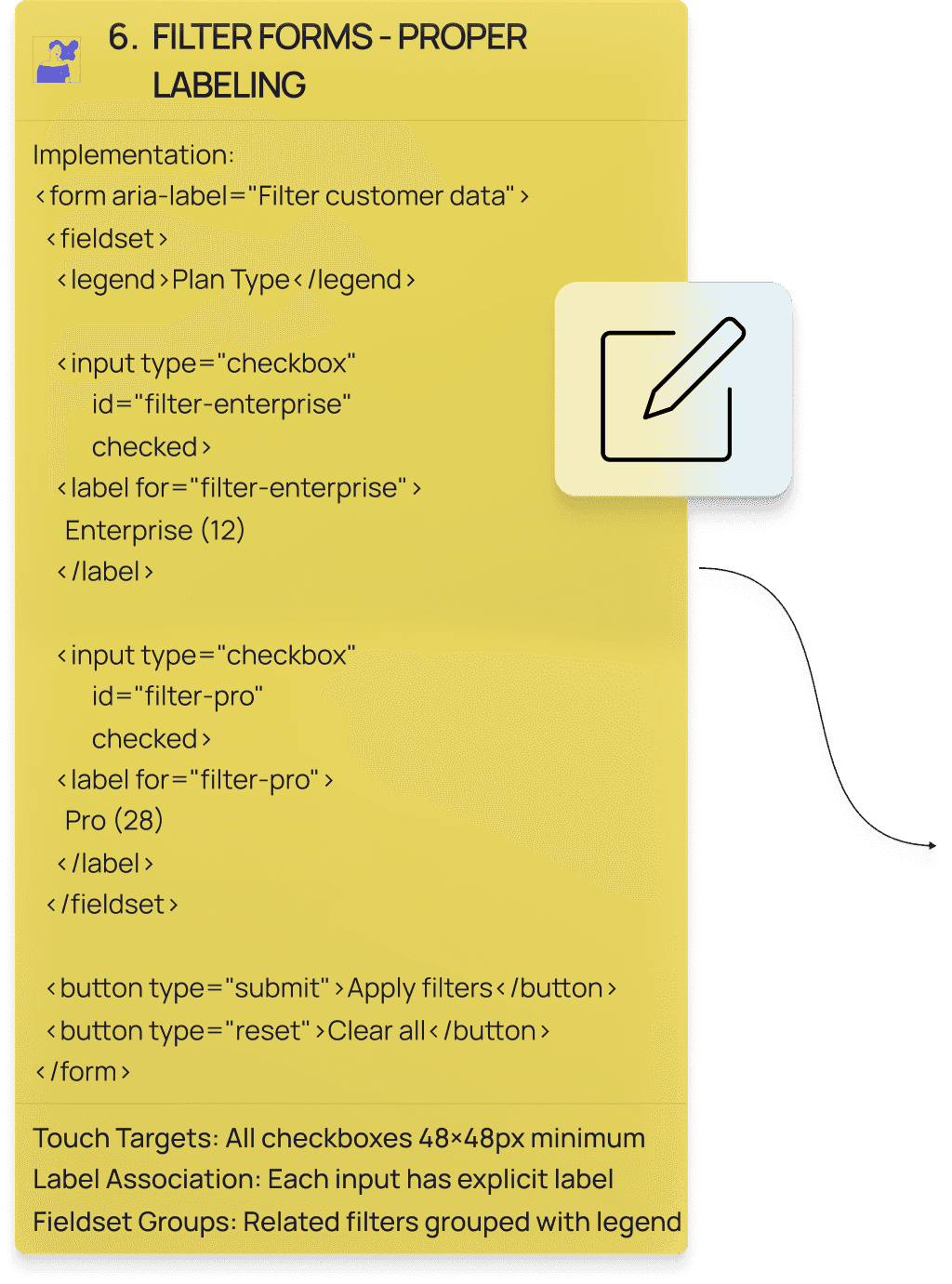
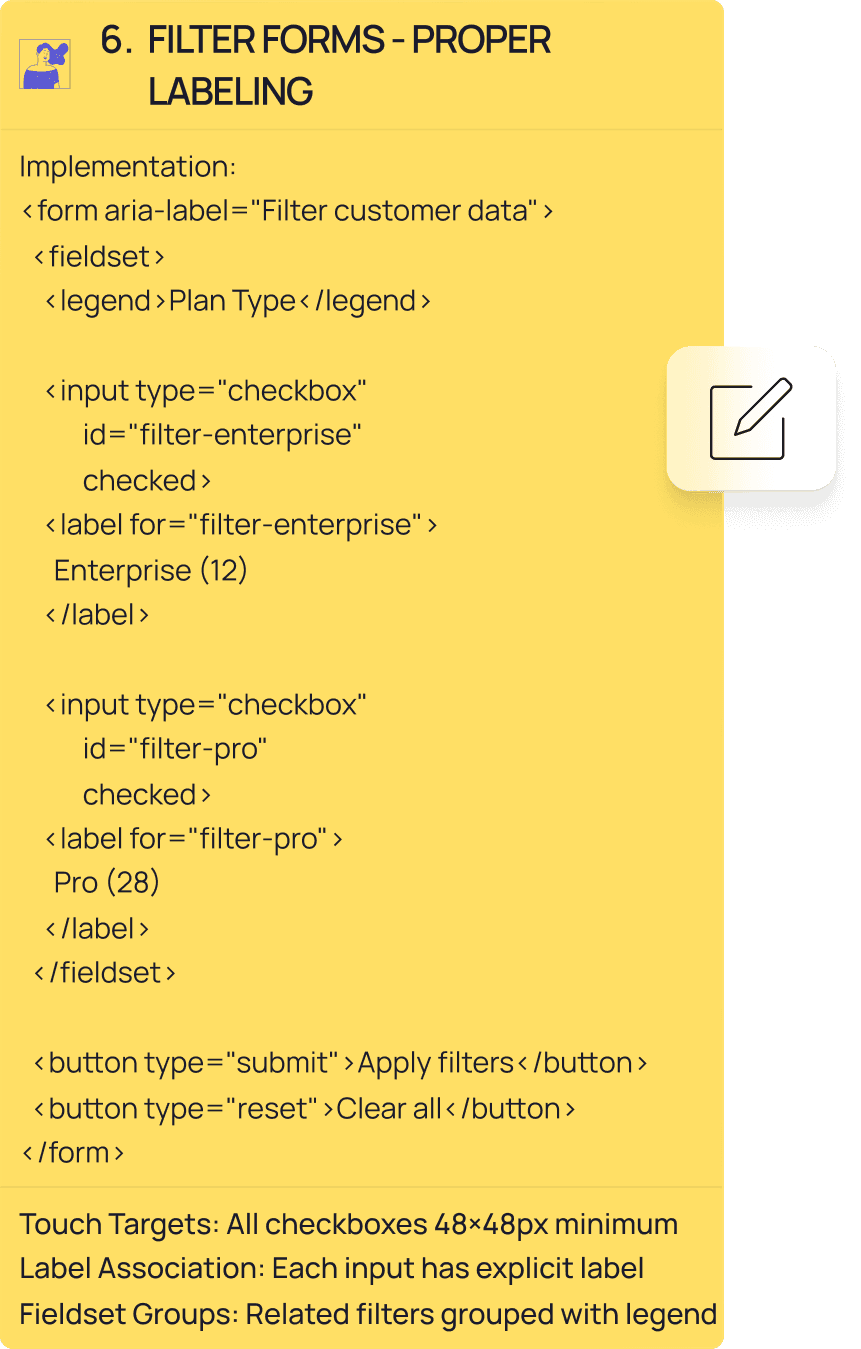
• Grouped filters with <fieldset><legend>Plan Type</legend> so screen readers announce context first.

• Every input has explicit label: <label for="filter-enterprise">Enterprise (12)</label>.

Touch targets 44px.

• Tab through, Space toggles, 3px focus indicators with 2-4px offset.

• Screen readers: "Plan Type, group. Enterprise 12, checkbox, checked. 1 of 3."

How I Validated

How I Validated

How I Validated

Contrast Testing

Contrast Testing

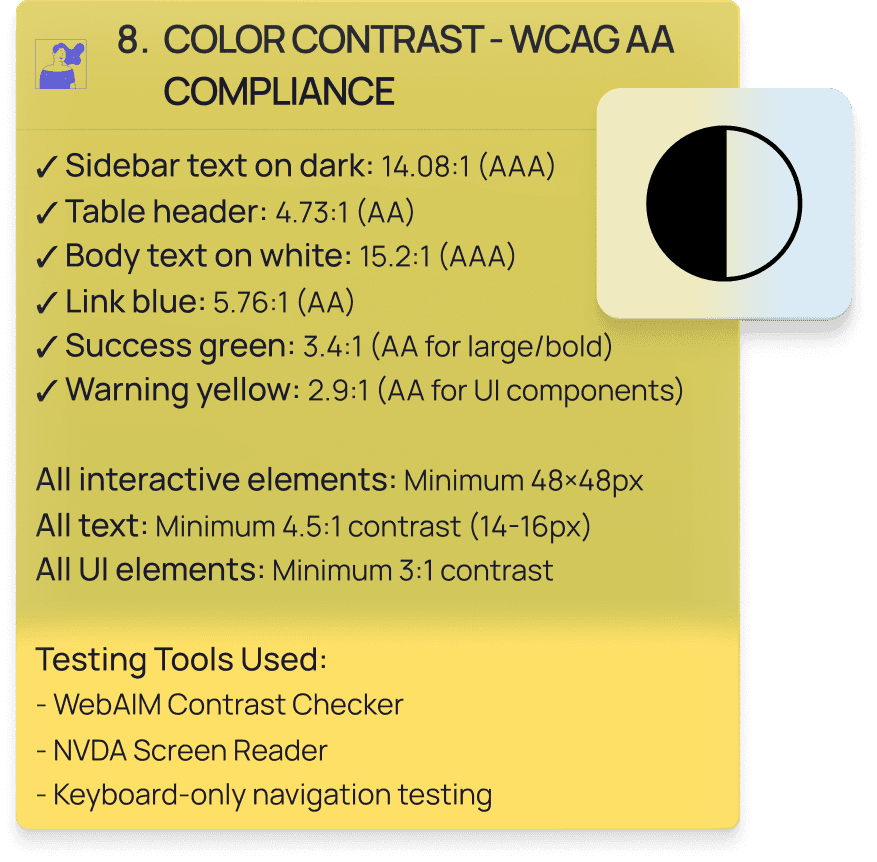
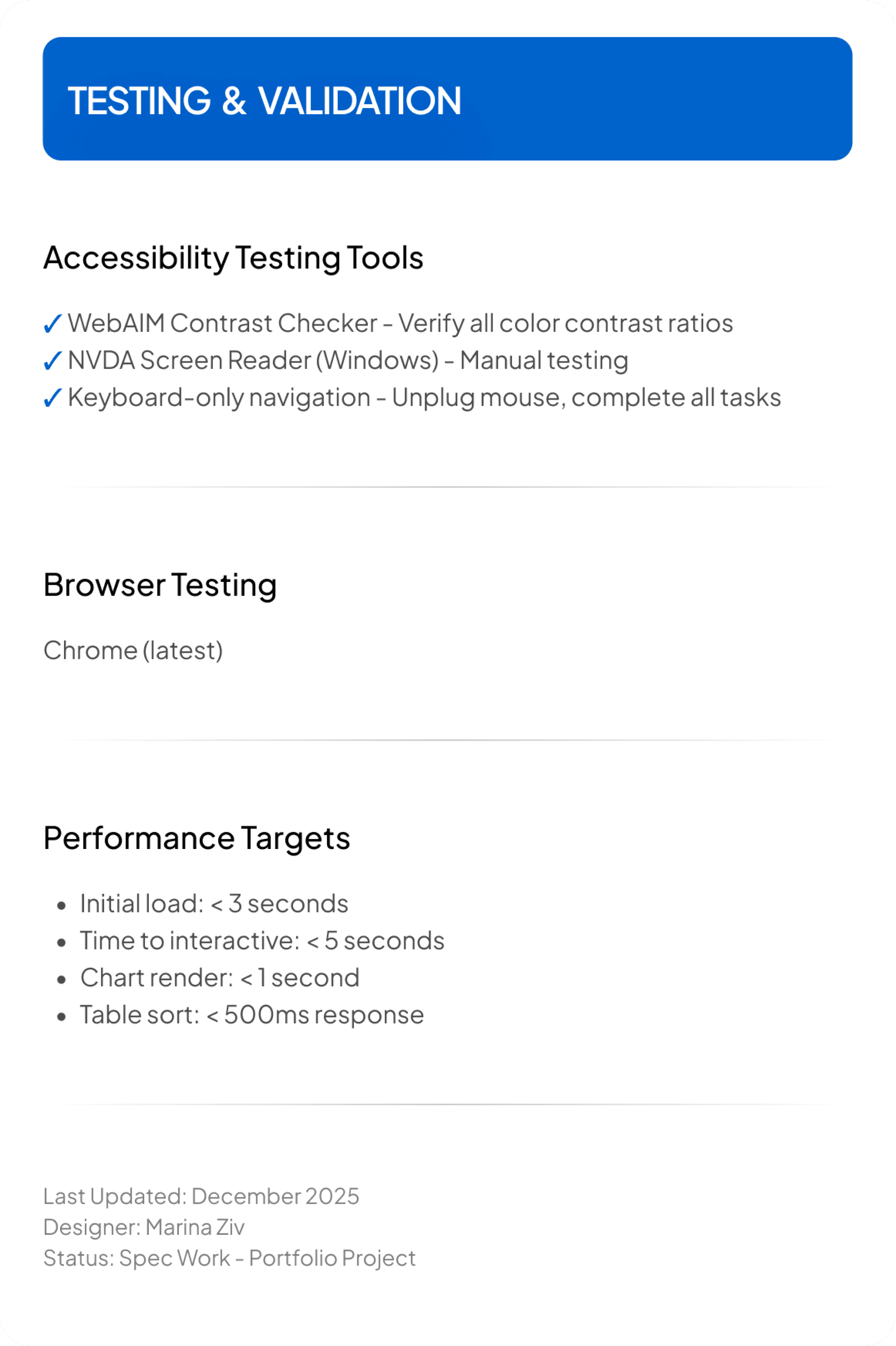
WebAIM Contrast Checker verified every combination.

Sidebar text 14.08:1 (AAA).

Table header 18.34:1 (AAA).

Body text 7.84:1 (AAA).

Interactive elements 4.13:1 (AA).

Focus indicators 3:1 minimum.

Status indicators never rely on color—always paired with text labels.

COLORS

Primary Blue

blue-600

4.44 AA

4.73 AAA

AA

#006fe8

rgb(0, 111, 232)

Use: Primary buttons, links, active states, chart lines

Success Green

green-600

6.96 AA

AA

3.01

AA

#2fb551

rgb(44, 170, 76)

Use: Active status indicators, positive trends, success states

Warning Yellow

orange-600

7.95 AAA

AA

2.64

#E88800

rgb(232, 136, 76)

Use: At-risk status indicators, warnings

Dark Background

grey-800

14.08 AAA

AA

#232C39

rgb(35, 44, 57)

Use: Sidebar navigation, dark UI elements

Text Primary

black

18.34 AAA

AA

#000000

rgb(0, 0, 0)

Use: Headings, body text, primary content

Text Secondary

grey-600

2.33

7.84 AAA

AA

#49494B

rgb(73, 73, 75)

Use: Headings, body text, primary content

Focus

purple-500

3.41

AA

3.6

AA

#AF52DE

rgb(175, 82, 222)

Use: Keyboard focus navigation

Background

white

21 AAA

AA

#ffffff

rgb(225, 225, 225,0.6)

Use: Card backgrounds, main content area

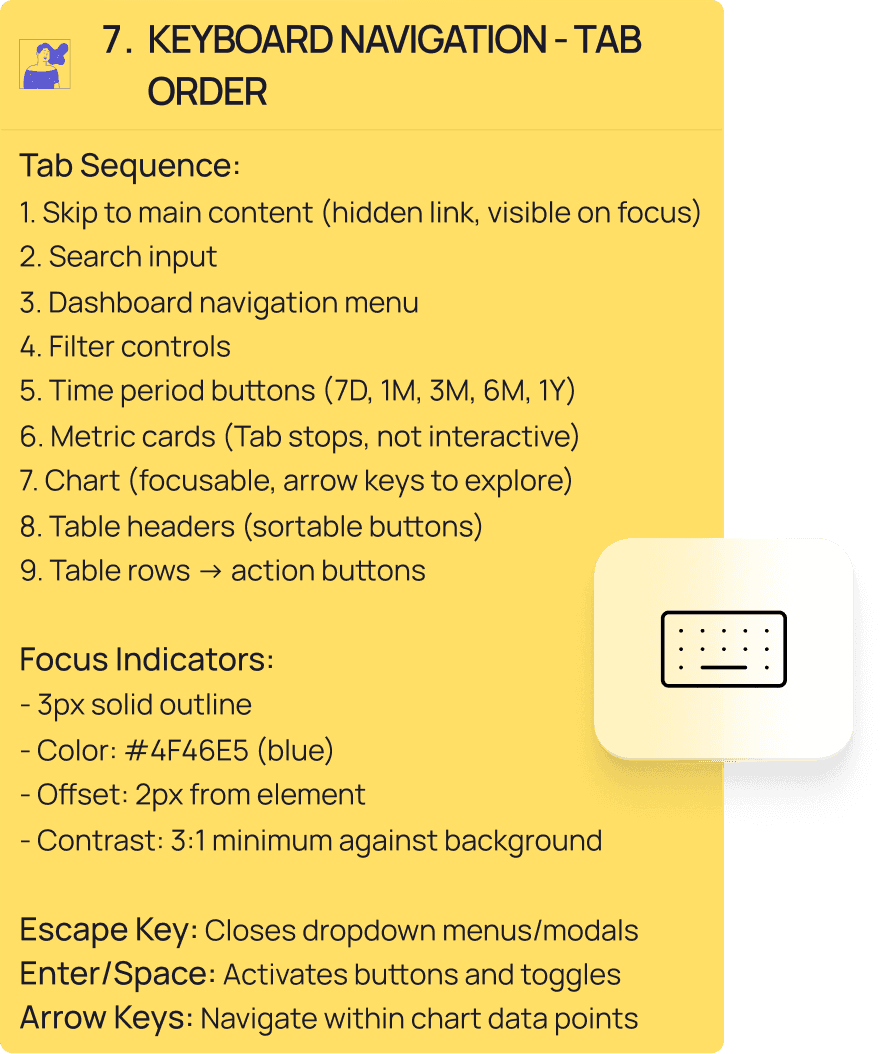
Keyboard Navigation

Keyboard Navigation

Keyboard Navigation

Complete keyboard control.

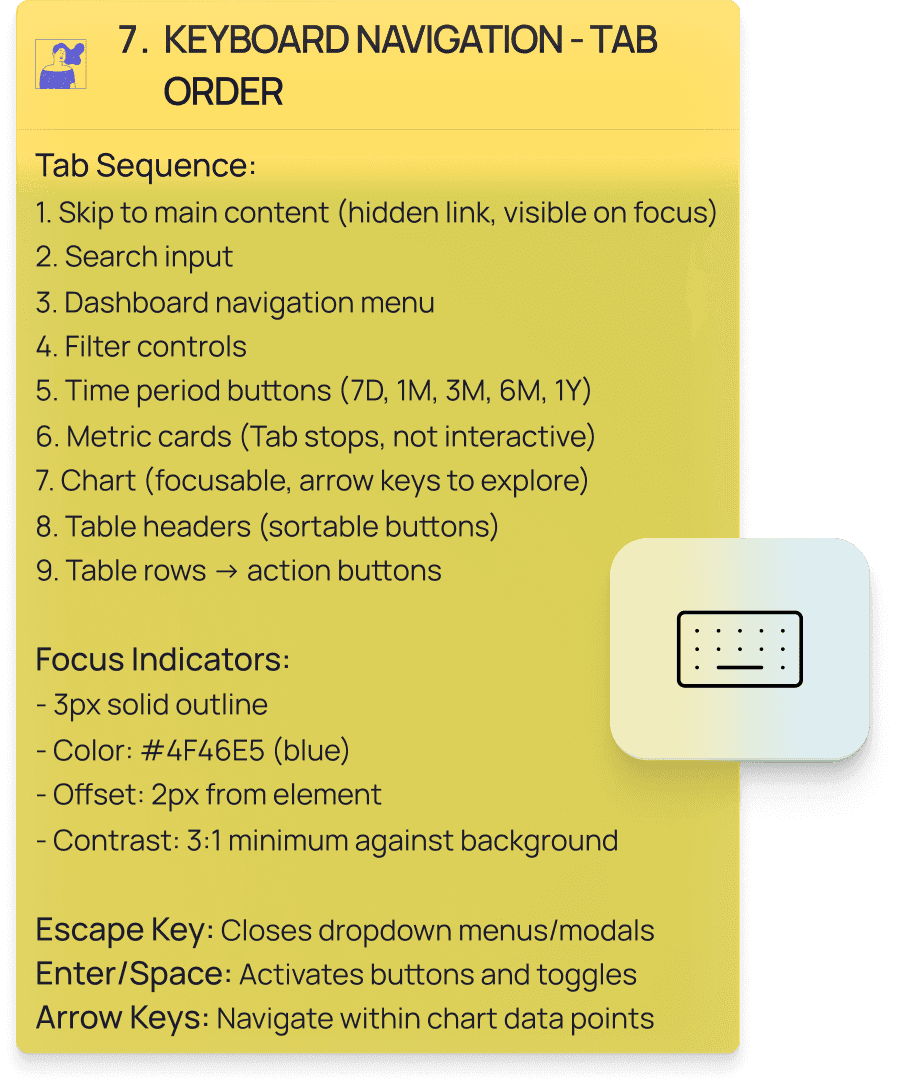
Skip to main content, then tab through navigation, filters, buttons, chart (arrow keys explore), sortable table headers, action buttons.

Tab order follows visual layout.

Enter/Space activates.

Arrow keys navigate.

Escape closes.

Focus indicators: 3px solid purple(#4F46E5), 2px offset, 3:1 contrast.

Screen Reader Testing with NVDA

Screen Reader Testing with NVDA

Screen Reader Testing with NVDA

Tested complete flow with NVDA on Windows. Semantic HTML landmarks (header, aside, main, section) provide structure.

What NVDA announces:

What NVDA announces:

What NVDA announces:

Table navigation: "MRR, column header button, sortable, currently sorted descending. 850 NIS. Acme Design Studio. Enterprise plan. 12 users. Active status."

Sort activation: "Sorted by MRR, currently highest to lowest. Press Enter to sort lowest to highest."

Chart description: "Revenue Growth - Last 30 Days. Image. Line chart showing revenue increasing from 6,520 NIS on November 19 to 8,198 NIS on December 15. Overall upward trend with 18 percent growth."

Metric updates: "Monthly Recurring Revenue. Status. 8,198 NIS. Increased by 18 percent."

Filter groups: "Plan Type, group. Enterprise 12, checkbox, checked. 1 of 3."


Chart includes hidden data table for complete dataset access.

Live regions announce updates politely.

Form labels associate correctly.
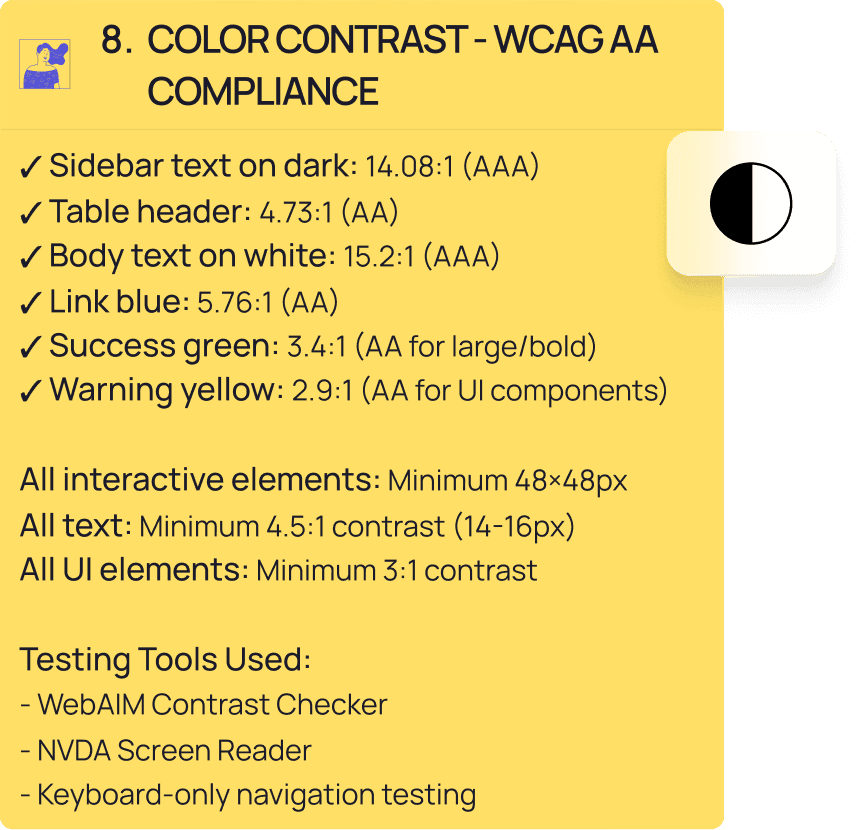
Testing Summary

Testing Summary

Testing Summary

Testing Summary

WebAIM Contrast Checker: All ratios meet WCAG AA (4.5:1 text, 3:1 UI)

Keyboard-only: Unplugged mouse. Every feature accessible via Tab, Enter, Space, Arrows, Escape.

Color blindness simulation: Information never color-dependent. Status indicators pair color with text.

Touch targets: 44px interactive elements, 32px dense table rows (desktop standard).

NVDA Screen Reader:

• Complete navigation tested.

• Table headers provide cell context.

• Sort states announce clearly.

• Chart has text description plus hidden data table.

• Live regions work without interruption.

• Filter groups announce context before options.

Technical Implementation

Technical Implementation

Technical Implementation

Technical Implementation

• WCAG 2.1 Level AA compliant.

• All text 4.5:1 minimum (most 7:1+).

• UI components 3:1 minimum.

• Complete keyboard functionality.

• Visible focus indicators 3:1 contrast.

ARIA patterns: Live regions for updates, sortable tables with state management, explicit form labeling, hidden screen reader content, semantic landmarks, icon button labels.

Keyboard navigation: Logical tab order, skip link, arrow key chart exploration, Enter/Space activation, Escape closes dropdowns.

• Color never conveys information alone.

• Status indicators combine color with text. Verified with WebAIM.

• Created developer documentation: color system, typography, spacing, component specs, ARIA patterns, keyboard requirements, testing checklist.

KEY COMPONENTS

Metric Card Component

Dimensions:

- Width: 270px

- Height: 140px

- Padding: 24px

- Border radius: 12px

- Background: #FFFFFF

- Shadow: 0 1px 3px rgba(0,0,0,0.1)

Structure:

- Icon (18×18px) + Label (14px, #6B7280)

- Spacing: 8px between icon and label

- Main value (36px, bold, #1A1A1A)

- Spacing: 12px below label

- Trend indicator (14px, green/red with arrow)

- Spacing: 8px below value

- Supporting text (12px, #9CA3AF)

- Spacing: 4px between lines

States:

- Default: As designed

- Loading: Skeleton shimmer animation

- Error: 2px red border, error message

Accessibility:

- <div role="status" aria-live="polite" aria-atomic="true">
- Trend arrow has aria-label="increased by" or "decreased by"

Button Component

Primary Button:

- Background: #4F46E5

- Text: #FFFFFF, 14px, medium weight

- Padding: 12px 24px (horizontal, vertical)

- Height: 48px (minimum touch target)

- Border radius: 8px

- Hover: Background #4338CA (darker blue)

- Active: Background #3730A3 (even darker)

- Disabled: Background #9CA3AF, cursor not-allowed, opacity 0.6

- Focus: 3px solid #4F46E5 outline, 2px offset from button


Secondary Button:

- Background: transparent

- Text: #4F46E5, 14px, medium weight

- Border: 2px solid #4F46E5

- Same dimensions and states as primary

- Hover: Background #EEF2FF (light blue tint)


Icon Buttons (Table Actions):

- Size: 32×32px (icon 16×16px inside)

- Padding: 8px

- Border radius: 6px

- Background: transparent

- Hover: Background #F3F4F6

- Focus: 3px solid #4F46E5 outline


Accessibility:

- aria-label required for icon-only buttons

- aria-disabled="true" when disabled (not just disabled attribute)

- Clear visible focus indicators (3px outline, 3:1 contrast)

Filter Checkboxes

Specifications:
- Checkbox size: 20×20px visual
- Touch target: 48×48px (includes label)
- Border: 2px solid #D1D5DB
- Checked: Background #4F46E5, white checkmark
- Border radius: 4px
- Label spacing: 12px from checkbox

States:
- Default: Unchecked, gray border
- Hover: Border #4F46E5
- Checked: Blue background, white check
- Focus: 3px solid #4F46E5 outline
- Disabled: Gray out, cursor not-allowed

Accessibility:
- <input type="checkbox" id="unique-id">
- <label for="unique-id">Label text</label>
- Grouped in <fieldset> with <legend>
- Keyboard: Tab to focus, Space to toggle

Color & Contrast Requirements

All contrast ratios meet WCAG 2.1 Level AA:

Sidebar text on dark (#1E293B): 14.08:1 (AAA)

Table header white on blue (#4F46E5): 4.73:1 (AA)

Body text on white: 15.2:1 (AAA)

Secondary text on white: 4.6:1 (AA)

Primary blue on white: 5.76:1 (AA)

Success green: 3.4:1 (AA for large text/UI components)

Warning yellow: 2.9:1 (AA for UI components only, always with text)

Status Indicators:

- Never use color alone to convey information

- Always pair colored dots with text labels

- Green "Active"

- Yellow "At Risk"

- Red "Churned"

Touch Targets

All interactive elements meet minimum size requirements:

- Buttons: 48×48px minimum

- Checkboxes: 48×48px touch target (visual can be smaller)

- Table action icons: 32×32px minimum (acceptable for dense data tables)

- Adequate spacing between targets: 8px minimum

Screen Reader Testing Checklist

✓ Test with NVDA (Windows) or VoiceOver (Mac)

✓ Navigate entire page using only Tab key

✓ Verify all interactive elements are reachable

✓ Check that content reading order is logical

✓ Confirm table headers are announced with each cell

✓ Verify chart has text alternative or hidden data table

✓ Test that live regions announce metric updates

✓ Ensure form labels are properly associated

✓ Check that error messages are announced

✓ Verify status updates are communicated clearly

Keyboard Navigation

Tab Order:

1. Skip to main content link (hidden, visible on focus)

2. Logo (optional, links to home)

3. Search input

4. User menu button

5. Dashboard navigation (sidebar)

6. Filter controls (Date Range → Plan Type → Customer Status)

7. Apply Filters button

8. Clear All button

9. Time period buttons (7D, 1M, 3M, 6M, 1Y)

10. Date range dropdown

11. Metric cards (focusable for screen readers, not interactive)

12. Chart container (focusable, arrow keys to navigate data points)

13. Table column headers (sortable buttons)

14. Table rows and action buttons

15. Pagination controls

Key Interactions:

- Tab / Shift+Tab: Navigate between focusable elements

- Enter / Space: Activate buttons, toggle checkboxes, sort table

- Arrow keys: Navigate chart data points, navigate within dropdowns

- Escape: Close dropdowns, cancel actions

- Home / End: Jump to first/last item in lists

Focus Indicators:

- 3px solid outline

- Color: #4F46E5 (primary blue)

- Offset: 2px from element edge

- Contrast: 3:1 minimum against adjacent colors

- Never remove outline (never outline: none)

Color & Contrast Requirements

All contrast ratios meet WCAG 2.1 Level AA:

Sidebar text on dark (#1E293B): 14.08:1 (AAA)

Table header white on blue (#4F46E5): 4.73:1 (AA)

Body text on white: 15.2:1 (AAA)

Secondary text on white: 4.6:1 (AA)

Primary blue on white: 5.76:1 (AA)

Success green: 3.4:1 (AA for large text/UI components)

Warning yellow: 2.9:1 (AA for UI components only, always with text)

Status Indicators:

- Never use color alone to convey information

- Always pair colored dots with text labels

- Green "Active"

- Yellow "At Risk"

- Red "Churned"

Touch Targets

All interactive elements meet minimum size requirements:

- Buttons: 48×48px minimum

- Checkboxes: 48×48px touch target (visual can be smaller)

- Table action icons: 32×32px minimum (acceptable for dense data tables)

- Adequate spacing between targets: 8px minimum

Screen Reader Testing Checklist

✓ Test with NVDA (Windows) or VoiceOver (Mac)

✓ Navigate entire page using only Tab key

✓ Verify all interactive elements are reachable

✓ Check that content reading order is logical

✓ Confirm table headers are announced with each cell

✓ Verify chart has text alternative or hidden data table

✓ Test that live regions announce metric updates

✓ Ensure form labels are properly associated

✓ Check that error messages are announced

✓ Verify status updates are communicated clearly

Technical Summary

Technical Summary

Technical Summary

Technical Summary

Accessibility: WCAG 2.1 Level AA

ARIA: Live regions, sortable tables, form controls, landmarks, semantic structure

Testing: NVDA, WebAIM, keyboard-only, color blindness simulation

Contrast: 4.5:1 text minimum (most 7:1+), 3:1 UI minimum

Touch Targets: 44px standard, 32px dense tables

Keyboard: Complete control, visible focus indicators

Documentation: Developer handoff specs

*Portfolio project demonstrating accessibility implementation for B2B SaaS analytics. December 2025. No real users or business metrics.*